

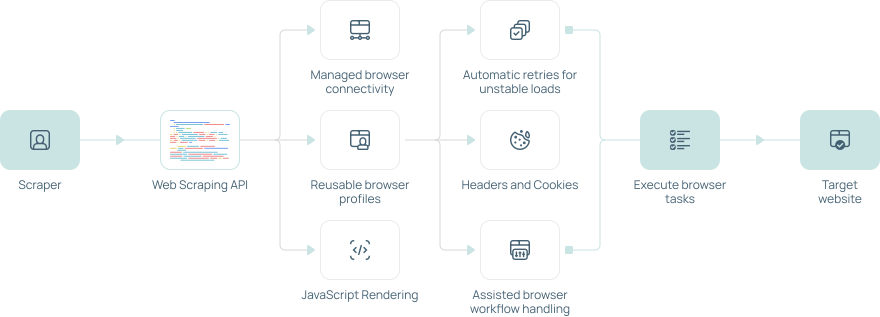


MegaIndex Cloud Browser API is a managed cloud browser environment for teams that need real browser execution without maintaining browser infrastructure themselves. It is built for browser automation, public web data workflows, QA testing, AI agent browsing, dynamic page processing, screenshots, file downloads, and structured data extraction from pages that require real browser behavior.
Browser API: Headless scraping browser in cloud
Headless browser API for AI agents, automation, and scraping - discover, access, extract, and interact with any public website. Ready for any model, pipeline, or workflow.
 No credit card required
  Instant scraper APIs
 AI-ready: Drop-in integration with leading LLM providers
 Unstoppable browsing infrastructure
 Auto-scaling infrastructure



Trusted by 400,000+ customers worldwide
How it works
Connect, automate, inspect - all in the cloud. Run managed browser sessions through an API built for web scraping, data extraction, testing, and automation. MegaIndex helps you render JavaScript pages, control sessions, connect proxies, manage captcha tasks, and collect public web data without maintaining your own browser infrastructure.
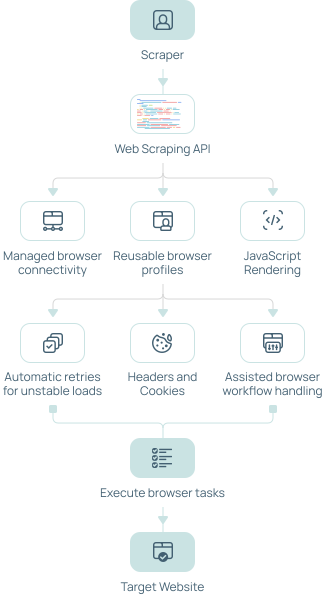

Contact sales
Need help with Browser API access, integration, pricing, or enterprise usage? Contact the MegaIndex team to discuss your scraping and automation requirements.
How to get started
Connect your automation tool to cloud browsers
const puppeteer = require('puppeteer-core');

async function main() {
  const connectionUri = process.env.MEGAINDEX_BROWSER_CDP_URL;

  if (!connectionUri) {
    throw new Error('MEGAINDEX_BROWSER_CDP_URL is not set');
  }

  const browser = await puppeteer.connect({
    browserWSEndpoint: connectionUri,
  });

  const page = await browser.newPage();
  await page.goto('https://example.com', {
    waitUntil: 'networkidle2',
    timeout: 60_000,
  });

  console.log(await page.title());
  await browser.disconnect();
}

main().catch((error) => {
  console.error(error);
  process.exit(1);
});const { chromium } = require('playwright');
async function main() {
const connectionUri = process.env.MEGAINDEX_BROWSER_CDP_URL;
if (!connectionUri) {
throw new Error('MEGAINDEX_BROWSER_CDP_URL is not set');
}
const browser = await chromium.connectOverCDP(connectionUri);
const context = browser.contexts()[0];
const page = await context.newPage();
await page.goto('https://example.com', {
waitUntil: 'networkidle',
timeout: 60_000,
});
console.log(await page.title());
await page.screenshot({ path: 'browser-api-test.png', fullPage: true });
await browser.close();
}
main().catch((error) => {
console.error(error);
process.exit(1);
});import asyncio
import os
from playwright.async_api import async_playwright
async def main() -> None:
connection_uri = os.environ["MEGAINDEX_BROWSER_CDP_URL"]
async with async_playwright() as playwright:
browser = await playwright.chromium.connect_over_cdp(connection_uri)
context = browser.contexts[0]
page = await context.new_page()
await page.goto(
"https://example.com",
wait_until="networkidle",
timeout=60_000,
)
print(await page.title())
await page.screenshot(path="browser-api-test.png", full_page=True)
await browser.close()
asyncio.run(main())import java.nio.file.Paths;
import com.microsoft.playwright.Browser;
import com.microsoft.playwright.BrowserContext;
import com.microsoft.playwright.Page;
import com.microsoft.playwright.Playwright;
public class BrowserApiExample {
public static void main(String[] args) {
String connectionUri = System.getenv("MEGAINDEX_BROWSER_CDP_URL");
if (connectionUri == null || connectionUri.isBlank()) {
throw new IllegalStateException("MEGAINDEX_BROWSER_CDP_URL is not set");
}
try (Playwright playwright = Playwright.create()) {
Browser browser = playwright.chromium().connectOverCDP(connectionUri);
BrowserContext context = browser.contexts().get(0);
Page page = context.newPage();
page.navigate("https://example.com");
System.out.println(page.title());
page.screenshot(new Page.ScreenshotOptions()
.setPath(Paths.get("browser-api-test.png"))
.setFullPage(true));
browser.close();
}
}
}using Microsoft.Playwright;
var connectionUri = Environment.GetEnvironmentVariable(
"MEGAINDEX_BROWSER_CDP_URL"
) ?? throw new InvalidOperationException(
"MEGAINDEX_BROWSER_CDP_URL is not set"
);
using var playwright = await Playwright.CreateAsync();
await using var browser = await playwright.Chromium.ConnectOverCDPAsync(
connectionUri
);
var context = browser.Contexts[0];
var page = await context.NewPageAsync();
await page.GotoAsync("https://example.com", new PageGotoOptions
{
WaitUntil = WaitUntilState.NetworkIdle,
Timeout = 60_000,
});
Console.WriteLine(await page.TitleAsync());
await page.ScreenshotAsync(new PageScreenshotOptions
{
Path = "browser-api-test.png",
FullPage = true,
});package main
import (
"context"
"encoding/base64"
"fmt"
"log"
"net/http"
"net/url"
"os"
"time"
"github.com/go-rod/rod"
"github.com/go-rod/rod/lib/cdp"
"github.com/go-rod/rod/lib/proto"
"github.com/gorilla/websocket"
)
type webSocket struct {
conn *websocket.Conn
}
func (socket *webSocket) Send(data []byte) error {
return socket.conn.WriteMessage(websocket.TextMessage, data)
}
func (socket *webSocket) Read() ([]byte, error) {
_, data, err := socket.conn.ReadMessage()
return data, err
}
func main() {
rawURL := os.Getenv("MEGAINDEX_BROWSER_CDP_URL")
if rawURL == "" {
log.Fatal("MEGAINDEX_BROWSER_CDP_URL is not set")
}
wsURL, err := url.Parse(rawURL)
if err != nil {
log.Fatalf("invalid MEGAINDEX_BROWSER_CDP_URL: %v", err)
}
if wsURL.User == nil {
log.Fatal("MEGAINDEX_BROWSER_CDP_URL does not contain credentials")
}
username := wsURL.User.Username()
password, ok := wsURL.User.Password()
if !ok {
log.Fatal("MEGAINDEX_BROWSER_CDP_URL does not contain a password")
}
// Send credentials explicitly during the WebSocket handshake.
wsURL.User = nil
auth := base64.StdEncoding.EncodeToString([]byte(username + ":" + password))
header := http.Header{"Authorization": []string{"Basic " + auth}}
ctx, cancel := context.WithTimeout(context.Background(), 60*time.Second)
defer cancel()
connection, response, err := websocket.DefaultDialer.DialContext(
ctx,
wsURL.String(),
header,
)
if err != nil {
if response != nil {
log.Fatalf("connect WebSocket: HTTP %s: %v", response.Status, err)
}
log.Fatalf("connect WebSocket: %v", err)
}
defer connection.Close()
client := cdp.New().Start(&webSocket{conn: connection})
browser := rod.New().Context(ctx).Client(client)
if err := browser.Connect(); err != nil {
log.Fatalf("initialize browser: %v", err)
}
page, err := browser.Page(proto.TargetCreateTarget{URL: "https://example.com"})
if err != nil {
log.Fatalf("open page: %v", err)
}
if err := page.WaitLoad(); err != nil {
log.Fatalf("wait for page: %v", err)
}
info, err := page.Info()
if err != nil {
log.Fatalf("read page info: %v", err)
}
fmt.Println("Title:", info.Title)
}
Integrations
 Python SDK
 JS/TS SDK
 Lovable
 Zapier
 Make
Make
 n8n
n8n
 Dify
Dify
 Langchain
 Langflow
 CrewAI
 LlamaIndex
 Flowise
 Composio
 CAMEL-AI
 Pipedream
 Praison AI
Pricing
Start free, then scale when your automation needs more browser sessions, higher concurrency, and dedicated support.
Free
Free test plan - $0 for 1 GB. For developers testing Browser API and building their automation workflows.
$0
/ GB
Start with included browser credits and connect through Playwright, Puppeteer, Selenium, or CDP.
Start for free-
 API access
-
Limited browser credits
-
Browser session logs
-
Connection configuration
Dev
For developers testing Browser API and building first automation workflows.
$2.5
/ GB
Custom paid plan based on your traffic volume, concurrency requirements, workflow setup, and support needs.
Quick start-
API access
-
Included browser credits
-
Browser session logs
-
Assisted browser workflow handling
-
Dedicated support
-
Zero-data retention
-
SSO
-
Advanced security
Enterprise
For teams running high-volume browser automation with custom limits, dedicated capacity, and priority support.
Custom
Get a plan tailored to your traffic volume, concurrency needs, proxy setup, and support requirements.
Contact sales-
API access
-
Limited browser credits
-
Browser session logs
-
Assisted browser workflow handling
-
Scrape unlimited
-
Dedicated support
-
Bulk discounts
-
Zero-data retention
-
SSO
-
Advanced security
Managed headless cloud browser infrastructure
MegaIndex gives developers access to scalable browser infrastructure through a remote API connection. Instead of running headless browsers on your own servers, you can load pages, render JavaScript, interact with websites, manage sessions, and extract data in a controlled browser environment.

Device emulation
Run sessions as real mobile or desktop devices with accurate browser and screen settings.

Assisted browser workflow handling
Easy define how browser sessions handle pages that require verification, review, or user interaction.

Ad blocking
Block ads and trackers to reduce bandwidth usage and improve page load speed.

Session persistence
Reuse the same proxy peer and browser state across multiple sessions.

Session ID access
Get active session IDs to inspect logs, debug issues, and track usage.

File downloads
Capture PDFs, CSVs, images, and other files directly from the browser session.
Built for JavaScript-heavy websites
Modern websites often rely on client-side rendering, lazy loading, cookies, sessions, browser checks, and anti-bot protection. Browser API is designed for pages that simple HTTP requests cannot process reliably.
Compatible with automation stacks
Connect browser API to Playwright, Puppeteer, Selenium, custom scrapers, backend services, and RPA tools. Developers get browser-level control while MegaIndex handles scaling, availability, and infrastructure maintenance.
Stable browser sessions
Use configurable browser sessions for rendering, session control, retries, and consistent page behavior across modern websites.
Browser automation without infrastructure overhead
Run browser-based scraping workflows in managed cloud sessions. MegaIndex handles rendering, proxies, session behavior, retries, and browser availability, while your team controls interactions, navigation, and extraction through Playwright, Puppeteer, Selenium, or CDP.
Why AI agents need MegaIndex
Most agent failures are not reasoning failures. They are access and context failures. The agent could not reach the page, crawl the website, extract the right data, or return it in a format the workflow could actually use.
Search
Search the web and get full content from results.

Scrape
Get llm-ready data from websites. Markdown, JSON, screenshot, etc.

Interact
Scrape a page, then interact with it using AI prompts or code.

Training data is always behind
Your model only knows the web up to a certain point. The page your user asks about may have changed yesterday, or may not have existed at all when the model was trained.
MegaIndex gives agents live access to web data through a scraping API instead of forcing them to rely on a static snapshot.

Generic scrapers return too much noise
Raw HTML is full of navigation, ads, scripts, cookie banners, and boilerplate. That forces the agent to separate signal from noise before it can do the actual work.
MegaIndex turns any URL into clean, structured markdown, so tokens are spent on useful content, not page clutter.

Agents need structured entities, not loose text
When an agent needs information about a company, product, or website, it should not have to crawl pages, parse layouts, and guess which details matter.
MegaIndex extracts typed structured data on demand: logos, brand colors, industry, social links, metadata, and other entity-level signals agents can use directly.

AI ready: Connect AI agent. MegaIndex handle the data layer.
Connect MegaIndex to your AI agents through API, CLI, Skills, or MCP. One connection gives your agent access to live web data without making your team build the scraping, proxy, rendering, cleanup, and extraction layer manually.
Your agent sends a request. MegaIndex collects the data, prepares it, and returns clean markdown or structured output ready to use.
Trusted in production. Proven at scale.

Fastest on the market

Billions of pages crawled and extracted without downtime

99.99% uptime

Regional connection options across global locations

2M+ developers using MegaIndex

Trusted in production. Proven at scale

300M+ monthly requests handled

BI-ready datasets
Power advanced browser workflows

Agent automation
-
Automate browser tasks with AI agents
-
Fill forms, search, click, and scroll
-
Start sessions with low latency
-
Keep workflows isolated and secure

Managed browser sessions
-
Configure browser environments
-
Regional settings
-
Session state
-
Workflow rules for page rendering and automation

AI-ready data pipelines
-
Collect data in real time or batch mode
-
Extract structured or unstructured output
-
Discover relevant sources automatically
-
Integrate with agents through MCP
Compliance
MegaIndex is built for lawful, authorized, and responsible access to web data. The service is intended for legitimate use cases such as SEO research, market analysis, website monitoring, brand intelligence, AI agent workflows, public data collection, accessibility tools, and testing systems you own or are authorized to test.
You may use MegaIndex to collect and process publicly available information when you have a lawful basis to do so and when your workflow respects applicable laws, website terms, privacy requirements, contracts, and third-party rights.
MegaIndex must not be used for illegal, deceptive, abusive, or unauthorized activity. Prohibited use includes phishing, spam, fraud, credential stuffing, account takeover, fake account creation, payment abuse, scraping private or confidential data, targeting systems without permission, bypassing access controls for unauthorized access, or collecting data in ways that violate laws, rights, or contractual obligations.
Users are responsible for how they use the service. We review abuse reports and may restrict or terminate access when MegaIndex is used in harmful, unlawful, or clearly prohibited scenarios.
Reviews web data for AI agents and automation
Discover, access, extract, and interact with any public website. Get structured, reliable. Ready for any service, model, pipeline, or workflow.

Ethan Gallardi
Head of Product at indexoid.com
MegaIndex helps us stay on top of daily SEO checks without slowing the team down. We can review changes faster, compare more data, and spend less time jumping between tools.

Victor Kane
Data Operations Lead at BTCIndex
We use MegaIndex to keep our market data checks in order. It is easy to use day to day and reliable enough for the monitoring tasks we run regularly.

Adrian Voss
Co-founder and CEO of 2Yachts
MegaIndex makes it much easier to follow listings and market changes. The team gets the information we need faster, without having to track every update manually.

Sofia Blake
Operations Manager at Work2Crowd
MegaIndex took a lot of repetitive work out of our process. It helps us check web data, track updates, and keep recurring tasks moving without extra manual effort.

Marcus Stone
Business Development Director at ALTWebGroup
MegaIndex is a useful tool for client research and everyday monitoring. It gives us quick access to the data we need and keeps the workflow simple.

Kirill Sokolov
Head of Digital Projects at IBSchool
MegaIndex helps us check website visibility, compare results, and prepare reports faster. It fits well into regular SEO and research work.

Alex Morgan
Product Strategy Lead at MegaIndex.org
MegaIndex keeps web data work straightforward. Teams can collect, check, and use public information without spending hours on routine tasks.

Sergey Karpovich
SEO and web analytics specialist
MegaIndex brings the key SEO and web analytics tools together in one place. The data features are practical, the interface is easy to work with, and API access is a real plus. Support has also been quick whenever needed.

Mikhail Shakin
SEO specialist and author
MegaIndex is one of the SEO analytics tools I keep coming back to. It gives SEO specialists and site owners useful data without putting everything behind a paywall.

Denis Morozov
SEO Product Manager at Be1
MegaIndex is helpful for search engine optimization checks, website analysis, and regular monitoring. It makes everyday research work faster and easier to manage.
Web data for AI agents and automation
Discover, access, extract, and interact with any public website. Get structured, reliable. Ready for any service, model, pipeline, or workflow.

Scraping API
Collect public web data at scale with ready-to-use browser automation tools. MegaIndex handles rendering, sessions, retries, and infrastructure stability so teams can focus on data quality instead of browser maintenance.
-
Managed connection settings
-
Verification and review workflow support
-
JavaScript rendering and page interactions
-
Consistent browser environment configuration

Browser API
Control any page via API - click, scroll, type, wait, and more, with Puppeteer and Playwright support.
-
Managed connection settings
-
Review and verification workflow support
-
Consistent browser environment configuration
-
Asynchronous browser automation
Data protection
MegaIndex provides information about privacy, account data, payment data, and data processing practices in its legal documents. Customers operating under GDPR or similar privacy frameworks should review the applicable policies and use Browser API in line with their own compliance obligations.


FAQ
Use a cloud browser when a page behaves more like an application than a static document: JavaScript rendering, asynchronous requests, scrolling, clicking, form filling, cookies, local storage, screenshots, file downloads, or persistent session state.
MegaIndex Cloud Browser moves browser updates, infrastructure, scaling, session state, logs, connection settings, crashes, retries, cleanup, monitoring, and error handling to the cloud so your application can focus on the workflow.
MegaIndex Cloud Browser works with Playwright, Puppeteer, Selenium, and other clients that support the Chrome DevTools Protocol.
Yes. MegaIndex Cloud Browser loads pages in a real browser environment, executes JavaScript, renders dynamic content, and lets your script wait for elements before interacting with the page or extracting data.
Yes. You can define regional settings, session rules, persistent browser state, and workflow-specific connection behavior depending on project needs.
Yes. MegaIndex Cloud Browser supports workflows where a page requires additional verification, review, confirmation, or user interaction during automation.
Yes. Persistent sessions can keep cookies, local storage, browser state, and session context across multiple steps.
Yes. MegaIndex Cloud Browser can emulate desktop and mobile environments, including viewport size, screen dimensions, user agent, and device-related browser settings.
Yes. MegaIndex Cloud Browser can handle file downloads inside the automation flow, including PDFs, CSV files, images, reports, exports, and other generated files.
Yes. AI agents can use MegaIndex Cloud Browser as a controlled web environment for live browser tasks.
Yes. MegaIndex Cloud Browser is designed for scalable browser automation and public web data workflows.
Common use cases include public web data collection, market research, SEO monitoring, price monitoring, browser-based QA, website testing, AI agent browsing, dynamic page processing, screenshots, file downloads, and structured data extraction from JavaScript-heavy pages.
MegaIndex Cloud Browser must be used only for lawful, responsible, and compliant automation. It must not be used for account abuse, credential attacks, spam, fraud, unauthorized access, privacy violations, harmful automation, or activity that breaks applicable laws, platform rules, or third-party rights.