

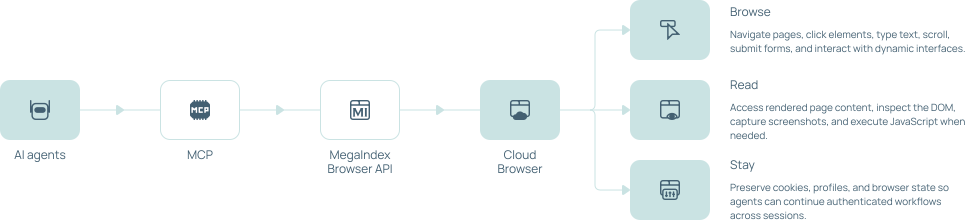

MegaIndex Browser MCP connects MCP-compatible AI agents to MegaIndex cloud browser infrastructure, allowing them to navigate and interact with websites through browser tools.
Browser MCP
Give your AI agent a real cloud browser. Connect Claude, Codex, Cursor, VS Code, and other MCP-compatible AI agents to a managed cloud browser. Navigate dynamic websites, interact with pages, reuse browser profiles, work through proxies, handle captcha challenges, and keep browser state between tasks — without running Chrome infrastructure yourself.
 No credit card required
  Search the web
 Extract data from any website
 Navigate and interact with pages
 Bypass blocks and restrictions



Trusted by 400,000+ customers worldwide
From prompt to browser result
Get Started with Browser MCP. Give your AI agent a task. MegaIndex Browser MCP turns it into browser actions, runs them in the cloud, and returns the result.
1
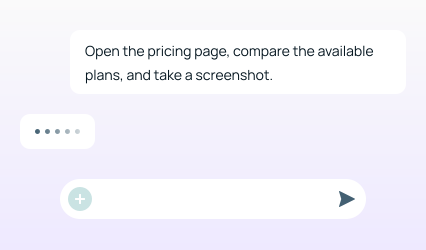
Prompt

You ask the AI agent
2
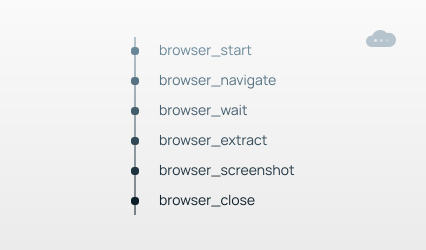
Browser execution
MegaIndex Browser MCP runs in the cloud
3
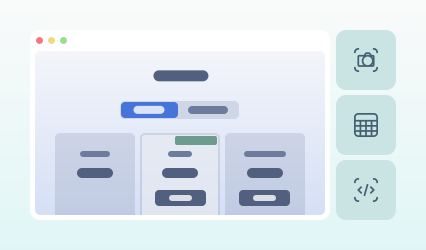
Result
The agent receives the results
Full headless browser access
Give AI agents the browser capabilities they need for real web workflows — from simple navigation to authenticated, multi-step sessions.
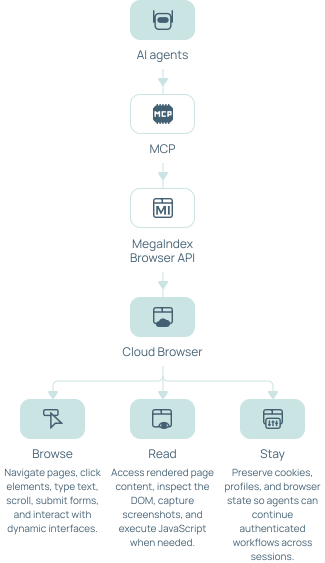
The real web is more than HTML
AI agents often fail when a website requires JavaScript, browser interaction, session state, a specific location, or additional verification. MegaIndex Browser MCP gives the agent a managed browser environment instead of forcing it to solve browser infrastructure on its own.
 Simple web request
-
 JavaScript required
-
Bot protection
-
Captcha
-
Login required
-
Session lost
-
Dynamic interface
 MegaIndex Browser MCP
-
 Real cloud browser
-
Proxy support
-
Browser profiles
-
Persistent state
-
Captcha handling
-
Browser interaction
Why use a cloud Browser MCP?
Local browser MCP servers give AI agents browser controls. They also leave browser deployment, proxies, session management, scaling, and other infrastructure to you. MegaIndex moves that browser infrastructure to the cloud.
Simple Web MCP
Local Browser MCP
MegaIndex Browser MCP
Read web pages
Click and type
Limited
JavaScript websites
Limited
Cloud browser
Persistent profiles
Manual
Proxy support
Depends
Manual
Integrated
Captcha workflow
Usually external
External
Integrated
Browser infrastructure
Managed
Self-managed
Managed
Remote execution
Usually local
Login once. Continue later.
Keep identity and state between tasks. Not every browser task starts from a clean session.
Reuse browser profiles, cookies, and authentication state so your agent can return to the same workflow without logging in from scratch every time.
Task 1
Open website
- Login
- Save browser profile
- End session
Task 2
Load profile
- Restore cookies and state
- Continue authenticated workflow
Connect MCP to your AI stack
Use MegaIndex Browser MCP with any compatible MCP client.
claude mcp add --transport http megaindex https://mcp.megaindex.com/mcp \
--header "Authorization: Bearer YOUR_API_TOKEN"{
"mcpServers": {
"megaindex": {
"command": "npx",
"args": ["@megaindex/mcp"],
"env": { "API_TOKEN": "YOUR_API_TOKEN" }
}
}
}codex mcp add megaindex --env API_TOKEN=YOUR_API_TOKEN -- npx @megaindex/mcp
# Or add it to ~/.codex/config.toml by hand:
[mcp_servers.megaindex]
command = "npx"
args = ["@megaindex/mcp"]
env = { API_TOKEN = "YOUR_API_TOKEN" }{
"mcpServers": {
"megaindex": {
"command": "npx",
"args": ["@megaindex/mcp"],
"env": { "API_TOKEN": "YOUR_API_TOKEN" }
}
}
}{
"mcpServers": {
"megaindex": {
"command": "npx",
"args": ["@megaindex/mcp"],
"env": { "API_TOKEN": "YOUR_API_TOKEN" }
}
}
}[mcp_servers.megaindex]
command = "npx"
args = ["@megaindex/mcp"]
env = { API_TOKEN = "YOUR_API_TOKEN" }{
"mcpServers": {
"megaindex": {
"command": "npx",
"args": ["@megaindex/mcp"],
"env": { "API_TOKEN": "YOUR_API_TOKEN" }
}
}
}{
"mcpServers": {
"megaindex": {
"command": "npx",
"args": ["@megaindex/mcp"],
"env": { "API_TOKEN": "YOUR_API_TOKEN" },
"disabled": false
}
}
}{
"task_type": "scrape",
"url": "https://example.com",
"data_format": "markdown",
"format": "json"
}Usecases

Web research
Let agents visit live websites, navigate between sources, and collect information directly from rendered pages.

Data collection
Extract information from JavaScript-heavy pages and workflows that require browser interaction.

Monitoring
Check changing pages, prices, dashboards, availability, and other live website data.

QA and verification
Let coding agents open applications, reproduce workflows, inspect pages, and capture screenshots.

Multi-step automation
Automate tasks that require navigation, forms, cookies, browser state, and several consecutive actions.
Start with MegaIndex Browser MCP
Automate tasks that require navigation, forms, cookies, browser state, and several consecutive actions.
Try for freeFAQ
No. Browser sessions run in the MegaIndex cloud.
Browser API is designed for direct application integrations through technologies such as Playwright, Puppeteer, and CDP. Browser MCP exposes browser capabilities directly to AI agents through Model Context Protocol.
Yes. Browser sessions can use proxy configuration supported by MegaIndex Browser API.
Browser profiles can preserve cookies and browser state so authenticated workflows can be reused across sessions.
Yes. Tasks run in a real browser environment capable of rendering and interacting with JavaScript-based websites.
MegaIndex Browser API provides captcha handling capabilities that can be used as part of browser automation workflows.
MegaIndex Browser MCP is designed for MCP-compatible clients such as Claude, Claude Code, Codex, Cursor, VS Code, Windsurf, Cline, and other MCP clients.
Not when an AI agent controls the browser through MCP. Playwright, Puppeteer, and CDP remain available for direct integrations through MegaIndex Browser API.
Data protection
MegaIndex provides information about privacy, account data, payment data, and data processing practices in its legal documents. Customers operating under GDPR or similar privacy frameworks should review the applicable policies and use Browser API in line with their own compliance obligations.


